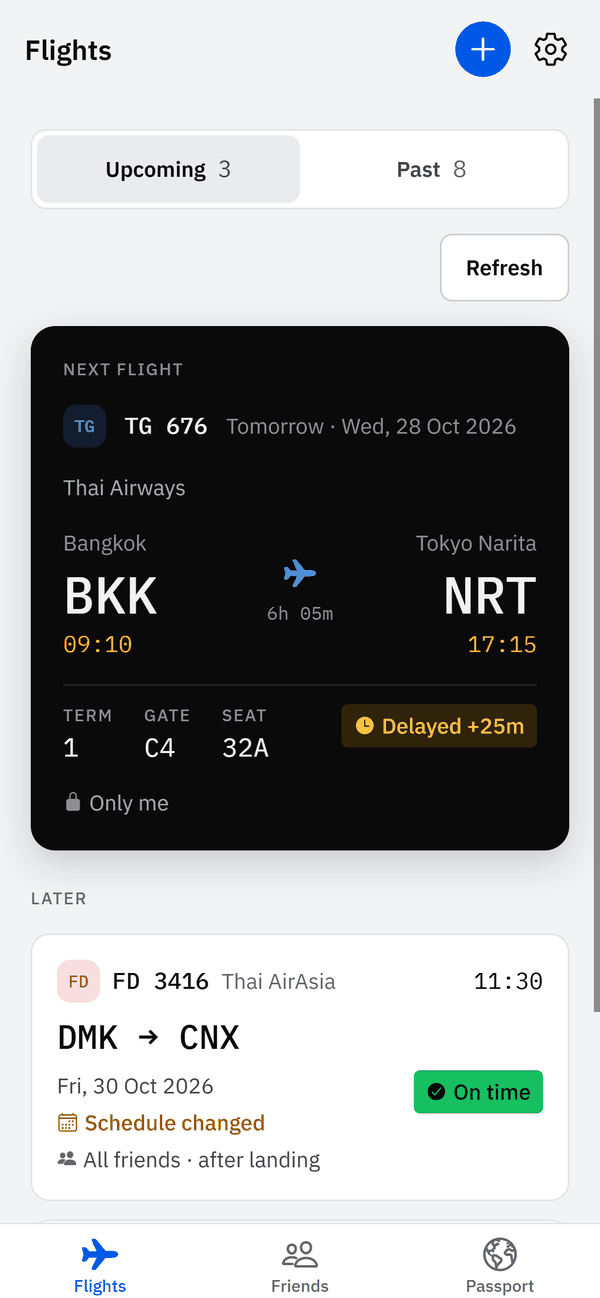
What is Fly Friendly?
Fly Friendly is a flight tracker app for iPhone and Android. Add a flight by number and date and it alerts you to delays of 15 minutes or more, gate and terminal changes, cancellations and diversions. It also keeps a logbook of your trips. Every flight stays private until you choose which friends can see it.
Is Fly Friendly free, and what does Pro cost?
Fly Friendly is free to download and use, with one banner ad. Pro is an optional monthly or yearly subscription that adds every alert, calendar sync and imports older than two years, and removes the ads. A 7-day Trip Pass is a one-off alternative that does not renew. The App Store and Google Play show current prices in your currency.
Yes. Fly Friendly runs on iPhone and Android. Anyone who wants to see a shared flight needs the app and an account.
Who can see my flights?
Nobody but you, until you share. New flights are private. For each flight you choose Only me, All friends or Selected friends, and “Only me until I land” shows the trip to friends only after you have landed. Notes and booking references are never shared with anyone.
Does Fly Friendly track my location?
Fly Friendly reads your phone's GPS only if you choose to use it on a flight map, and only while that screen is open. The position is not stored, logged or sent to us. The free plan shows ads from Google AdMob, which can estimate your approximate location from your IP address. Pro shows no ads.
Where does Fly Friendly get its flight data, and how accurate is it?
Flight status, gates and delays come from a third-party flight-data provider. We send it the flight number and date, never your name, email or account. The data can differ from airport screens, so check the airport displays before you travel. Flights you enter by hand have no live status.
Which flight alerts does Fly Friendly send?
Free accounts get alerts for delays of 15 minutes or more, gate and terminal changes, cancellations and diversions. Pro adds boarding, takeoff, landing and baggage-belt alerts, where the airport shares belt data. In Notifications you can switch the delay, gate, boarding, takeoff, landing and baggage alerts on or off. Cancellations and diversions are always sent.
Can I follow a friend's flight and get an alert when they land?
Yes, if your friend shares the flight with you. Open it in Friends and tap Notify me, and you get an alert when they land. You can also invite friends who are on the same flight. You both need Fly Friendly, and sharing starts only after both of you accept.
Does Fly Friendly support Thai and Chinese?
Yes. The app is available in English, Thai and Simplified Chinese, with light and dark themes, and this website has the same three languages. You set the language in the app. You can write to support in English or Thai.
I used another flight app. Can I move my flights to Fly Friendly?
Yes. You can import past flights from other flight apps or from a CSV file. The last two years of flights import free; older flights need Pro. The file is read on your phone, and names, emails and account details in it are skipped.
How do I cancel Fly Friendly Pro?
Pro is billed by Apple or Google, not by Fly Friendly, so cancel in the store. On iPhone: Settings, your name, Subscriptions, Fly Friendly. On Android: Google Play, profile picture, Payments and subscriptions, Subscriptions. Cancel at least 24 hours before renewal. Deleting the app does not cancel it.
How do I delete my Fly Friendly account and data?
In the app: tap the gear icon, then Profile and settings, Account, Delete account, and type the confirmation word shown (DELETE in English). Your account and data are deleted straight away. Without the app, email support@flyfriendly.site from your sign-in address and we delete the account within 7 days of your confirmation. Cancel any Pro subscription in the store first, because deleting the account does not cancel it. What is kept is listed on the Delete your account page.
Do I need an account?
Yes. Friends, sharing, alerts and syncing belong to an account, so you sign in with your email address before you use the app.
 Fly Friendly